
# The "System Board 3D" Tool

System Board 3D is an intuitive tool designed to visually capture complex systemic relationships. The three-dimensional representation allows you to adopt perspectives that go far beyond analytical reflection.
Expand Table of Contents
The Power of Visualization
Working in a 3D space activates deeper brain regions, releasing associative and emotional impulses that provide fresh insights and fuel the innovation process.
# Getting Started & Operation
All participants can individually adjust their camera angles and zoom levels to view the board from the perspective that works best for them.
# Basic Controls
| Action | Mouse | Notebook Touchpad / Tablet | Keyboard |
|---|---|---|---|
| Change Angle | Hold left button and move mouse | Move finger on touch surface | Shift + Arrow Keys |
| Zoom (+/-) | Scroll mouse wheel | Two-finger pinch gesture | - |
| Move Position | Hold right button and move mouse | Place and move two fingers | Shift + Ctrl + Arrow Keys |
# The Toolbar
The System Board features a specialized toolbar at the top of the 3D area.
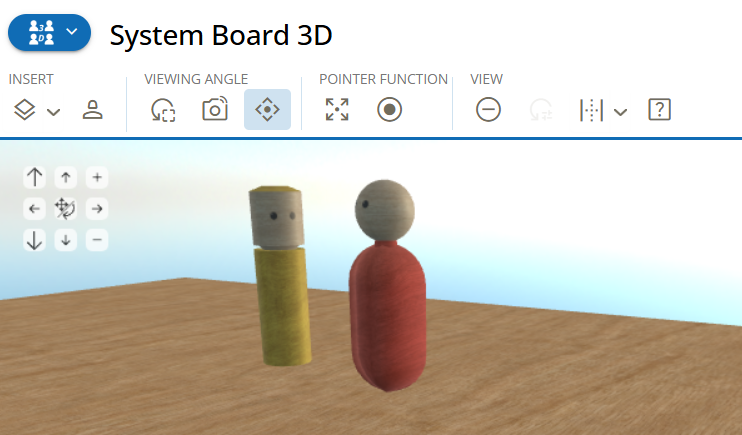
Figure: Toolbar with camera control overlay enabled
# "Insert" Section
This is where you select the elements for your constellation:
- layers Boards: Use "Select Board" to load different system boards (e.g., with divided areas). You can change this selection during the process, similar to sliding two board halves together. You can also upload your own graphics as a board background, offering endless variations.
- person_2 Figures: Use "Select and Insert Additional Figure" to add wooden figures, geometric shapes (cube, sphere, pyramid), animals, or symbols.
# "Viewing Angle" Section
- reset_focus Set Standard Viewpoint: Resets the camera to an overview position at a comfortable distance.
- linked_camera Set Current Viewpoint for All: Transmits your current camera position to all other participants so they can see exactly what you see. Additionally, the tool will start with this specific view the next time the session is loaded.
- control_camera Camera Control Buttons: Displays a digital D-pad for fine-tuning the camera if navigation via mouse or touchpad is not precise enough.
# Working with Figures
Once a figure is placed on the board, you can activate it by clicking on it. A blue frame (cage) will appear.
- Transform: Use the thicker handle points on the blue cage to rotate the figure or change its size.
- Context Menu: Clicking also opens a menu with the following options:
- eye_tracking Change Perspective – Immediately adopt the viewpoint of the figure.
- edit Edit (Text): Enter a text label for the figure.
- delete_forever Delete: Remove the figure from the board.
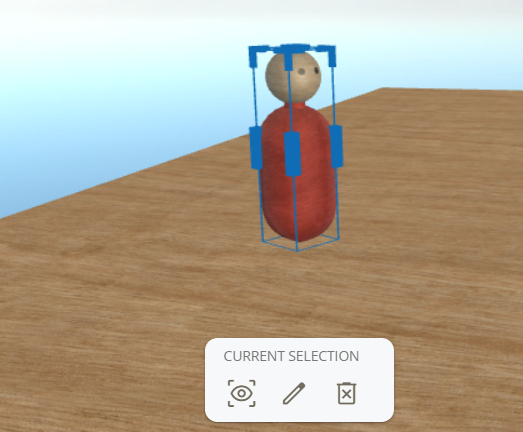
Figure: Resizing/rotating a figure and the context menu
# Troubleshooting: Hardware Acceleration
For the System Board 3D to run smoothly, your browser's hardware acceleration must be enabled. If the tool is lagging, please check the following settings:
# Google Chrome
- Enter address:
chrome://settings/system - Enable: "Use graphics acceleration when available"
- Restart the browser.
# Microsoft Edge
- Enter address:
edge://settings/system/manageSystem#GraphicsAcceleration&1 - Enable: "Use graphics acceleration when available"
- Restart the browser.
# Mozilla Firefox
- Menu → Settings → General.
- Scroll to Performance.
- Uncheck "Use recommended performance settings."
- Check "Use hardware acceleration when available."
- Restart Firefox.
# Safari (macOS)
Acceleration is usually active by default on Apple devices. If problems occur, check Safari → Settings → Advanced for specific graphics or "experimental" features.
System Warning
If you were automatically redirected to this page, the system detected that hardware acceleration is disabled in your browser. Without this setting, smooth use of the 3D area is significantly impaired.